GTA Character Creation: Complete GTA Online Guide

GTA character creation is one of the most exciting features of Grand Theft Auto Online, allowing players to build personalized avatars before exploring the streets of Los Santos. From selecting facial features and hairstyles to experimenting with clothing and accessories, Rockstar Games offers customization options that make every character feel distinctive. Whether you want a realistic appearance, a fashionable personality, or a creative roleplay identity, understanding the character creator helps you design an avatar that matches your imagination.
The GTA Online character creator includes a unique heritage system that influences facial structure through maternal and paternal appearance presets. Players can adjust resemblance, skin tone, facial proportions, and cosmetic details to develop their preferred look. This comprehensive guide explores male and female character customization, realistic appearance settings, hairstyles, clothing, and character editing. It also explains common mistakes, appearance-change restrictions, and practical techniques for creating a memorable online personality.
What Is GTA Character Creation?
GTA character creation is the process of designing a personalized playable avatar in Grand Theft Auto Online. Unlike GTA V’s story mode, where players control established protagonists Michael De Santa, Franklin Clinton, and Trevor Philips, GTA Online allows users to develop original characters. These avatars participate in heists, races, businesses, cooperative missions, and competitive activities while representing each player’s preferred appearance and identity throughout the multiplayer environment.
The customization system includes heritage selection, facial adjustments, hairstyles, makeup, and other cosmetic options. Players can experiment with different combinations to create realistic appearances or deliberately stylized personalities. Although facial customization does not directly determine mission success, it contributes to immersion and personal expression. A carefully designed character can become a recognizable part of the player’s online experience, especially during social activities and roleplaying sessions.
How to Create a GTA Online Character Step by Step
Starting GTA character creation requires entering Grand Theft Auto Online and selecting an available character slot. New players are generally directed to the character creator during their initial setup. The interface provides several appearance categories that help establish the avatar’s facial structure and personal style. Before making final selections, players should explore the available settings and understand which choices can be modified later through the appearance editor.
Begin by choosing the character’s presentation and experimenting with the heritage system. Select maternal and paternal presets, adjust resemblance, and refine individual facial features. Next, review hairstyles, eyebrows, and available cosmetic options to create a balanced appearance. Examine the character from multiple angles whenever possible before confirming the design. Once completed, the avatar enters GTA Online, where additional clothing and appearance customization becomes available through various in-game services.
Understanding GTA Online Heritage Settings
The heritage system is one of the most distinctive features of the GTA Online character creator. Instead of relying entirely on predefined faces, players choose maternal and paternal appearance presets that influence the character’s facial structure. Resemblance settings determine how strongly the avatar reflects either selected parent. This approach creates numerous possible combinations, allowing players to develop different facial shapes before applying individual adjustments.
Choosing suitable heritage settings requires experimentation because different combinations produce noticeably different results. Some presets create softer facial proportions, while others emphasize stronger jawlines, cheekbones, or distinctive facial structures. Players seeking realistic appearances should compare several combinations rather than immediately selecting the first attractive option. A balanced foundation generally makes later adjustments easier, especially when refining the nose, eyes, chin, and overall facial symmetry.
GTA Female Character Creation Guide
Female GTA character creation offers numerous possibilities for designing realistic, fashionable, or distinctive avatars. The process begins with heritage selection, where different maternal and paternal combinations influence facial proportions. Players can then adjust features such as the eyes, nose, cheeks, jaw, and chin. Small changes often create significant improvements, particularly when the goal is a natural appearance that remains balanced from different viewing angles.
Hairstyles, eyebrow shapes, makeup, and clothing choices provide additional opportunities for personal expression. Players can create casual streetwear characters, luxury-inspired personalities, athletic designs, or professional appearances. Natural makeup and complementary hair colors often work well for realistic styles, while dramatic cosmetics suit more expressive designs. Reviewing the completed face under different lighting conditions can help identify adjustments before the character’s appearance is finalized.
GTA Male Character Creation Guide
Male GTA character creation focuses on selecting suitable heritage presets and refining facial proportions to match a preferred style. Players can experiment with different parent combinations before adjusting the jawline, nose, eyebrows, cheeks, and chin. A balanced facial foundation often produces better results than extreme adjustments. However, players creating fictional personalities or roleplay characters may intentionally choose exaggerated features to establish a distinctive visual identity.
Popular male character styles include modern streetwear, athletic fashion, luxury business clothing, and criminal-inspired outfits. Hairstyles and facial hair can dramatically influence the final appearance, making them important customization choices. A carefully selected beard may emphasize the jawline, while different haircuts can change the overall personality. Experimenting with several combinations helps players develop a recognizable appearance that complements their preferred clothing and gameplay style.
GTA Online Facial Features and Customization
Facial customization plays an essential role in GTA character creation because individual adjustments can significantly influence the final appearance. The character editor provides controls for features such as the nose, eyebrows, cheeks, jaw, and chin. These settings allow players to refine their avatars beyond the initial heritage selection. Understanding how different facial proportions interact helps produce a more cohesive design without relying on exaggerated modifications.
For realistic results, players should make gradual adjustments and regularly review the entire face. A character that looks attractive from the front may appear noticeably different from the side, particularly around the nose and chin. Checking multiple viewing angles helps identify disproportionate features. Maintaining balance between the eyes, cheekbones, and jawline can also create a more natural appearance that remains consistent during regular gameplay.
Best GTA Online Hairstyles and Makeup
Hairstyles contribute significantly to the overall appearance of a GTA Online character. Players can experiment with different cuts, lengths, and colors to match their preferred personality. A hairstyle that complements the face can make the entire design appear more balanced, while unusual colors or dramatic cuts create distinctive visual identities. Barber shops also provide opportunities to explore additional styles after the initial character creation process.
Makeup and cosmetic settings offer further personalization, particularly for characters designed around specific fashion themes. Depending on the avatar, players can experiment with eyebrows, lipstick, eye makeup, facial hair, and other appearance options. Subtle combinations often create realistic results, while stronger cosmetics can support glamorous or stylized designs. Matching these details with clothing and accessories helps establish a consistent appearance that reflects the player’s creative preferences.
Best GTA Character Creation Settings for Beginners
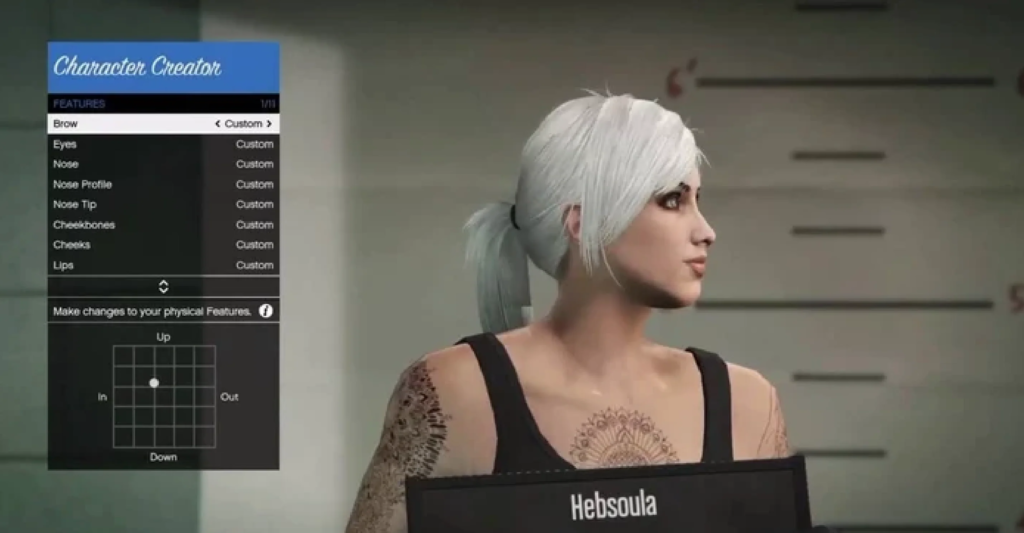
Beginners should approach GTA character creation by focusing on the most important appearance settings before experimenting with smaller details. Start with heritage presets that provide a suitable facial foundation, then adjust resemblance and individual features gradually. Reviewing the character after each major modification makes the process easier to manage. This approach also reduces the likelihood of creating unintended facial proportions through excessive adjustments.
There is no universally perfect combination because players have different preferences for realistic, fashionable, or exaggerated appearances. Some prefer natural facial proportions, while others enjoy distinctive features that make their avatars stand out. Choosing complementary hairstyles, balanced facial settings, and suitable cosmetic details generally creates a cohesive design. Beginners should prioritize an appearance they personally enjoy rather than copying every setting from popular customization tutorials.
How to Make a Realistic GTA Online Character
Creating a realistic GTA Online character requires careful attention to facial proportions, heritage settings, and cosmetic details. Begin with a parent combination that produces a natural-looking foundation. Adjust the eyes, nose, cheeks, and jaw gradually while considering how each modification affects the entire face. Moderate changes often produce believable results, especially when the goal is to create a character resembling an ordinary person rather than an exaggerated fictional personality.
Lighting can also influence how an avatar appears during customization and regular gameplay. A face that looks balanced inside the editor may appear slightly different outdoors, during missions, or in cinematic scenes. Choosing complementary hairstyles, natural makeup, and consistent clothing can strengthen the overall design. Reviewing the character from different angles before confirming the appearance helps achieve results that remain visually appealing across different environments.
GTA Online Character Outfits and Accessories
Clothing customization allows players to develop their characters beyond facial appearance. GTA Online includes numerous outfit categories, such as casual clothing, formalwear, athletic apparel, and luxury-inspired fashion. Players can combine individual clothing pieces to create distinctive looks suited to missions, social activities, or roleplaying environments. Selecting a consistent fashion direction can help establish a recognizable character identity throughout different multiplayer experiences.
Accessories such as hats, glasses, watches, and jewelry provide additional opportunities for personalization. Tattoos can also contribute to a character’s visual identity, particularly when combined with specific clothing styles. Players interested in realistic appearances may prefer understated accessories, while others enjoy bold combinations. Experimenting with outfits allows existing characters to feel refreshed without requiring major facial changes or a complete redesign through the appearance editor.
How to Change Your GTA Online Character Appearance
Players who become dissatisfied with their initial design can use GTA Online’s Change Appearance feature. This option is generally accessible through the Interaction Menu, although its exact location may vary depending on the platform and game version. The standard appearance-change fee is GTA$100,000. The editor allows players to revise several facial and heritage-related settings without creating an entirely new character.
Before confirming modifications, review the updated appearance carefully because some original character choices remain restricted. The appearance editor does not provide unlimited control over every selection made during initial creation. Hairstyles, clothing, and certain cosmetic details can also be changed separately through appropriate in-game shops. Understanding these options helps players decide whether a full appearance edit is necessary or a simpler cosmetic adjustment will achieve their desired result.
Can You Change Your GTA Online Character’s Gender?
GTA Online does not normally provide a standard option to change an existing character’s gender through the appearance editor. Although players can modify various facial features and cosmetic settings, certain fundamental selections remain restricted. This limitation makes the initial character creation process important, particularly for users who want a specific avatar presentation throughout their multiplayer experience.
Players interested in creating a character with a different gender can consider using another available character slot. Supported GTA Online versions provide two character slots, allowing users to maintain separate avatars. However, character-specific progression, properties, and other account details should be reviewed before making changes. Creating another character offers greater flexibility without relying on unofficial modifications or potentially unreliable customization glitches.
GTA Character Creation on PS5, Xbox, and PC
GTA character creation is available across supported PlayStation, Xbox, and PC versions of Grand Theft Auto Online. The central customization experience includes heritage selection, facial adjustments, hairstyles, and cosmetic options. However, interface layouts and menu organization may differ between editions. Players should follow the options displayed in their installed version rather than assuming every tutorial uses identical navigation instructions.
Console players generally navigate the character creator using controllers, while PC users can work with a keyboard, mouse, or compatible controller. Regardless of platform, the most effective approach involves reviewing appearance settings carefully before confirming them. Graphics quality and lighting conditions can influence how the finished character looks during gameplay, so players should consider these visual differences when evaluating their designs.
GTA Online Character Creation vs FiveM
GTA Online provides Rockstar’s official multiplayer character creator, allowing players to establish personalized avatars within the standard online environment. Its customization system includes heritage settings, facial adjustments, hairstyles, and other cosmetic features. Characters participate in official missions, races, businesses, and cooperative activities. This structured approach offers a consistent foundation for players interested in customizing their appearances while progressing through GTA Online.
FiveM provides a different multiplayer experience through community-operated GTA V servers, many of which focus on roleplaying. Character creation features depend on the resources and customization systems installed by individual server operators. Some environments include additional clothing options, appearance controls, or identity systems. Players should therefore distinguish FiveM tutorials from official GTA Online guides because available settings and character creation procedures may differ considerably.
Common GTA Character Creation Mistakes
One frequent mistake during GTA character creation is rushing through heritage and facial settings without reviewing the completed appearance. Extreme adjustments can create unintended proportions, particularly around the jaw, nose, and cheeks. Players may also overlook how hairstyles, makeup, and facial hair influence the overall design. Taking time to compare different combinations can prevent disappointing results after the character enters regular gameplay.
Another common mistake involves assuming every customization choice can be changed later without restrictions. Certain original selections remain limited, while appearance editing may require an in-game payment. Players should also avoid following outdated tutorials without checking their current game version. Reviewing the character from different angles and understanding the available customization options can help create a more satisfying design from the beginning.
Why GTA Character Creation Matters
GTA character creation adds personal identity to Grand Theft Auto Online by allowing players to design avatars that reflect their preferred styles and personalities. Instead of controlling established story protagonists, users can develop original appearances that represent their creative choices. This freedom contributes to immersion during cooperative missions, competitive activities, and social interactions, particularly when players regularly participate in multiplayer sessions with friends.
Character customization also provides long-term creative opportunities as players progress through GTA Online. New outfits, hairstyles, accessories, and cosmetic details allow avatars to evolve alongside changing preferences. Players can establish recognizable fashion styles or experiment with entirely different appearances over time. This combination of personalization and open-world gameplay helps make character customization an enjoyable feature for beginners and experienced players alike.
Conclusion
GTA character creation gives players the freedom to design personalized avatars through heritage settings, facial adjustments, hairstyles, clothing, and accessories. Understanding how these customization options interact makes it easier to create realistic or distinctive appearances. Whether designing a male or female character, experimenting with balanced features and complementary cosmetic details can produce satisfying results that reflect individual preferences and creative ambitions.
The most effective approach is to explore the available tools patiently and review important choices before confirming them. Players can continue refining their appearance through in-game services, although certain original selections remain restricted. By combining thoughtful facial customization with creative clothing choices, GTA Online players can develop memorable characters that feel unique throughout their adventures in Los Santos.
Frequently Asked Questions
How do you create a character in GTA Online?
Enter GTA Online, select an available character slot, choose heritage settings, customize facial features, and confirm your completed appearance.
What are the best GTA Online character creation settings?
The best settings depend on personal preference. Balanced heritage selections, moderate facial adjustments, and complementary hairstyles often produce natural-looking results.
Can you change your GTA Online character’s appearance?
Yes. The Change Appearance feature allows certain modifications, usually for a standard fee of GTA$100,000.
Can you change your GTA Online character’s gender?
No. The standard appearance editor does not normally allow players to change an existing character’s gender.
Can you create more than one GTA Online character?
Yes. Supported GTA Online versions provide two character slots, allowing players to create separate avatars with different appearances.
You May Also Read: GTA Character Meme